![dmax300.png]](https://kb.dentimax.com/hs-fs/hubfs/dmax300.png?height=40&name=dmax300.png)
Author: Cooper Small
Overview
When DentiMax Practice Management cannot reach the DMSRVR (DentiMax Database Server) service, the following error will appear on screen:
DBISAM Engine Error # 11280 — A connection to the database server at [IP ADDRESS] cannot be established
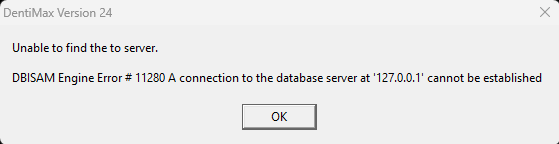
The IP address shown in the error will be the server's IP, or a loopback address such as 127.0.0.1 when connecting on the server machine itself. If this error is office-wide, it is a critical issue requiring immediate attention. This article covers the three most common causes and their resolutions.
For more information, we've compiled a detailed runbook for this topic in the Troubleshooting section below.
Before You Begin
Confirm the following before proceeding:
- You have RDP access (via Splashtop or AnyDesk) to either the server or the affected device:
- If the issue is office-wide, connect to the server computer.
- If the issue is isolated to one or more workstations, connect to the affected device(s).
- Your RDP connection has administrator rights. In Splashtop, this should be indicated near the top-left of the connection window.
Procedure
📄Database Connection Error (On-Prem)Additional Troubleshooting
| DMSRVR will not stop or restart | Open the Processes tab in Task Manager, locate any DMSRVR processes, select them, and click End Task. Then return to the Services tab and attempt to start DMSRVR again. |
| DentiMax still cannot connect after all three steps | Temporarily disable any non-Windows antivirus software on the server to confirm whether it is blocking DMSRVR. If disabling the antivirus resolves the issue, notify a member of the office's management or IT administrator and confirm how they wish to proceed before making any permanent changes. |
For issues not covered by this runbook, contact DentiMax Practice Management Support at 1
(800) 704-8494 Ext. 805 or Support@DentiMax.com.